
Webhooks
New Webhooks section in integrations providing ability to send specific events to these webhooks.
The Webhooks feature allows you to subscribe to real-time events triggered by the Gupshup platform and receive updates on your callback URL. This enables you to automate your workflows, monitor system-level changes, and track message delivery statuses as they happen.
How to configure Webhooks?
- Log into your Gupshup Console.
- Navigate to your App > Integration > Webhooks.
- Click on create Webhook.
- Choose the module and respective events:
- WhatsApp
- Profile (Account)
- Template
- Campaign Manager and API
- Delivery events
- WhatsApp
- Add your Callback URL and save.
Important Note: You can configure only 1 URL for Delivery Events. Additional webhooks created will update the URL and events will be sent to the latest URL saved.
Once configured, the Gupshup platform will begin pushing events to your callback URL via HTTPS POST requests.
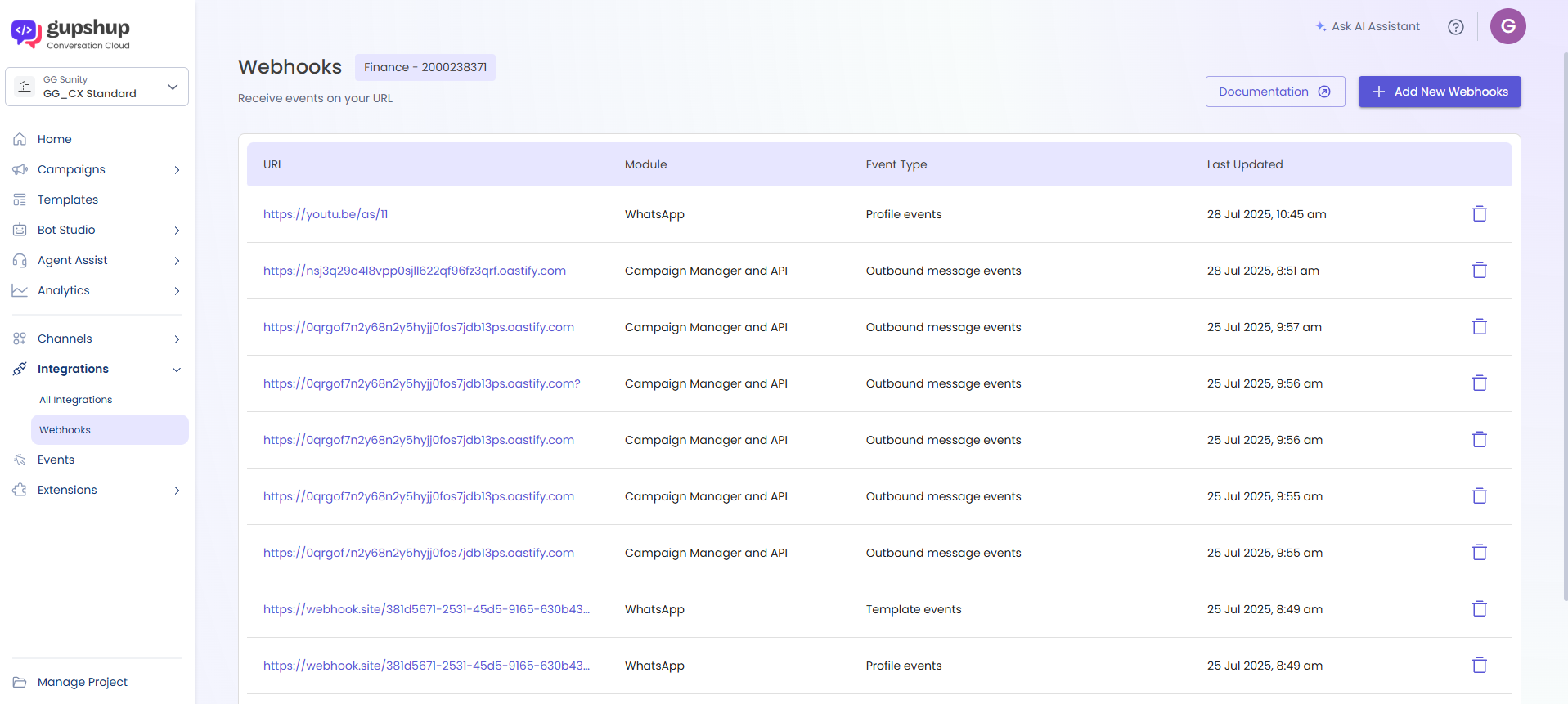
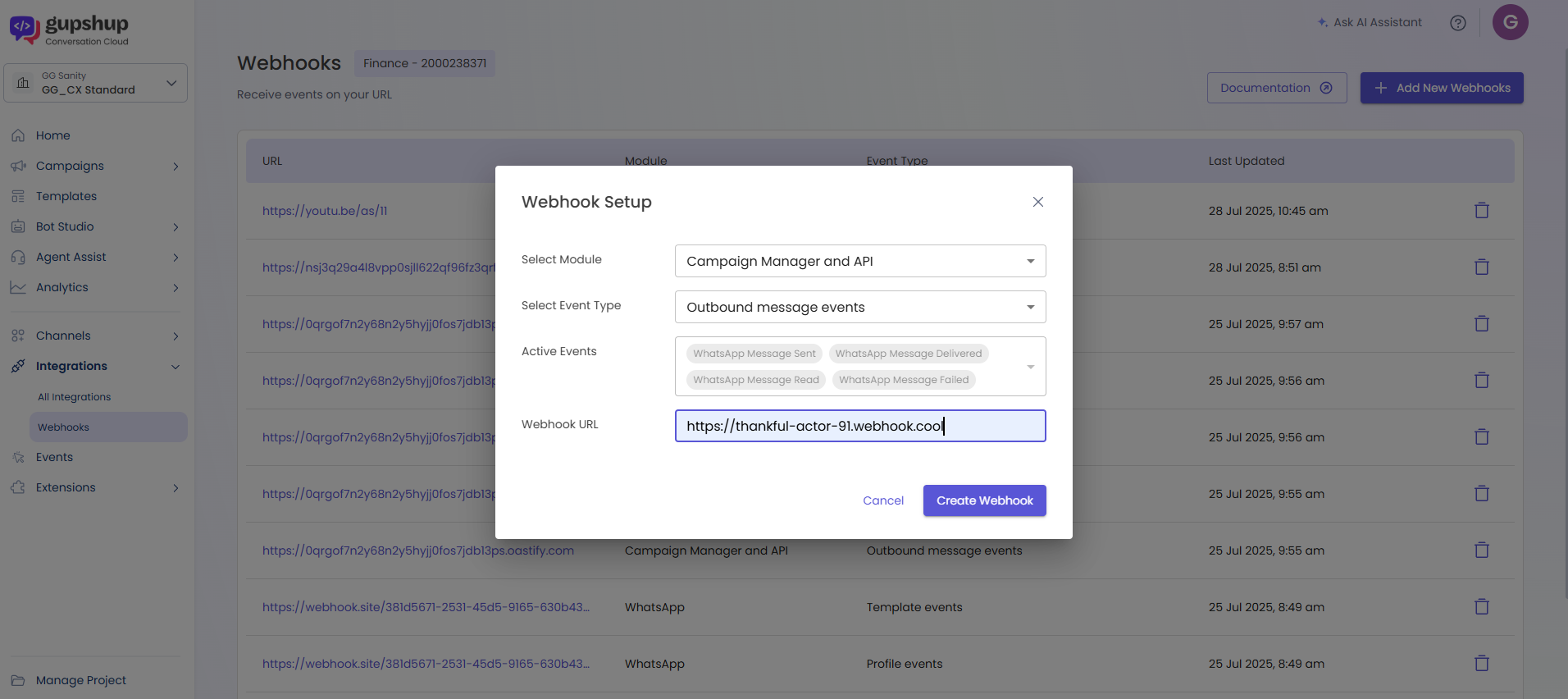
You can configure your app to receive the following categories of webhook events:
- Profile Events
- Template Events
- Delivery Events
Event Types
- Profile Events (Account Events)
Profile or Account Events are triggered when a change or update occurs in your WhatsApp Business Account (WABA), such as:- Business review status
- Policy violations
- WABA restrictions
- Tier changes
- Capability updates
🛠️ Event Types
| Event Type | Description |
|---|---|
review-event | Triggered when WABA is approved or rejected. |
status-event | Triggered when your WABA's status changes (e.g., disabled, restricted, verified). |
pndn-event | Status updates of submitted phone number or display name. |
tier-event | Notification for quality-related tier status changes (e.g., TIER_1K to TIER_10K). |
capability-event | Messaging capability updates (e.g., maxDailyConversationPerPhone). |
🧾 Sample Payload
- Review event
`{
"app": "jeet20",
"timestamp": 1636986446609,
"version": 2,
"type": "account-event",
"payload": {
"type": "review-event",
"payload": {
"status": "approved",
"actionDate": "January 31,2021"
}
}
}`
- status-event(account violation)
`{
"app": "jeet20",
"timestamp": 1636986446609,
"version": 2,
"type": "account-event",
"payload": {
"type": "status-event",
"payload": {
"status": "ACCOUNT_VIOLATION",
"violation_type": "GAMBLING"
}
}
}`
- status-event(account disable)
`{
"app": "<appname>",
"appId": "<id>",
"timestamp": 1713531530035,
"version": 2,
"type": "account-event",
"payload": {
"type": "status-event",
"payload": {
"status": "DISABLE",
"actionDate": "February28,2024"
}
}
}`
- status-event(account restriction)
`{
"app":"appname",
"timestamp":1636986446609,
"version":2,
"type":"account-event",
"phone":"9180xxxxxxxx",
"payload":{
"type":"status-event",
"payload":{
"status":"ACCOUNT_RESTRICTED",
"restrictionInfo":[
{
"restrictionType":"RESTRICTION_ADD_PHONE_NUMBER_ACTION",
"expiration":1636986446609
},
{
"restrictionType":"RESTRICTED_BIZ_INITIATED_MESSAGING",
"expiration":1636986446609
},
{
"restrictionType":"RESTRICTED_CUSTOMER_INITIATED_MESSAGING",
"expiration":1636986446609
}
]
}
}
}`
- status-event(reinstate)
`{
"app": "ShipxxxxxxxxxxxxxxxxxxWapp",
"appId": "e4c9dbe0-b1ef-4add-97a2-a8fdba0666ad",
"phone": "918xxxxxxxxx2",
"timestamp": 1717061550941,
"version": 2,
"type": "account-event",
"payload": {
"type": "status-event",
"payload": {
"status": "REINSTATE",
"actionDate": "30 May 2024"
}
}
}`
- pndn-event
`{
"app": "jeet20",
"timestamp": 1636986446609,
"version": 2,
"type": "account-event",
"payload": {
"type": "pndn-event",
"payload": {
"status": "approved/rejected",
"rejectedReason": "INVALID_FORMAT"
}
}
}`
- tier-event
`{
"app": "jeet20",
"timestamp": 1636986446609,
"version": 2,
"type": "account-event",
"payload": {
"type": "tier-event",
"payload": {
"event": "onboarding/ upgrade/ downgrade /unflagged/ flagged",
"oldLimit": "TIER_10K",
"currentLimit": "TIER_100K"
}
}
}`
- capability-event
`{
"app":"appname",
"timestamp":1636986446609,
"version":2,
"type":"account-event",
"payload":{
"type":"capability-event",
"payload":{
"maxDailyConversationPerPhone":100,
"maxPhoneNumbersPerBusiness":100
}
}
}`
Key : Description
review-event : Triggered when the submitted WABA is approved or rejected.
Possible values: APPROVED, REJECTED
status-event : Triggered when the status of the WABA changes.
Possible values:
- ACCOUNT_VIOLATION: WABA flagged due to policy violation.
- ACCOUNT_DISABLE: WABA has been disabled.
- ACCOUNT_VERIFIED: App upgraded from Sandbox to Live.
- ACCOUNT_RESTRICTED: WABA restricted due to policy issues.
Restriction types:
• RESTRICTION_ADD_PHONE_NUMBER_ACTION
• RESTRICTED_BIZ_INITIATED_MESSAGING
• RESTRICTED_CUSTOMER_INITIATED_MESSAGING
(Includes restriction expiry)
pndn-event : Triggered when the status of a submitted Phone Number or Display Name is updated.
Possible values:
- INVALID_FORMAT
- NAME_END_CLIENT_VIOLATION
- NAME_FORMAT_UNACCEPTABLE
- NAME_NOT_CONSISTENT
- NAME_INDIVIDUAL_ISSUE
- NAME_ENDCLIENT_NOTRELATED
tier-event : Notifies changes in the messaging tier of a phone number.
Event values: ONBOARDING, UPGRADE, DOWNGRADE, UNFLAGGED, FLAGGED
Tier levels: TIER_250, TIER_1K, TIER_10K, TIER_100K, TIER_UNLIMITED
capability-event : Provides updates on WABA's messaging capabilities.
Includes:
- maxDailyConversationPerPhone: Max users a phone number can message daily.
- maxPhoneNumbersPerBusiness: Max phone numbers allowed in a business.
(Minimum limit shown across phone numbers)
waba_id : Unique identifier of the WhatsApp Business Account (WABA).
owner_business_id : Meta Business Manager ID that owns the WABA and associated assets.
ad_account_id : Meta Ad Account ID linked for running Click-to-WhatsApp ads or templates in MM Lite.
- Template Events
Template events notify you of the status or category of your WhatsApp message templates. These are generated automatically by Gupshup when any change occurs.
📌 Event Types
| Type | Description |
|---|---|
status-update | When template status changes (e.g., approved, rejected, paused). |
category-update | When WhatsApp migrates templates to new categories. |
quality-update | Notifies the quality score assigned to templates by WhatsApp. |
🔁 Automatic Template Category Migration
Starting June 1, 2024, if a template is incorrectly categorized, you will receive two events:
- A category alert with current and correct category.
- A final update once the change is applied.
✅ First Payload (Alert)
{ "type": "template-event", "payload": { "type": "category-update", "category": { "current": "MARKETING", "correct": "UTILITY" } } }
📤 Second Payload (Confirmed Update)
json
{ "type": "template-event", "payload": { "type": "category-update", "category": { "old": "MARKETING", "new": "UTILITY" } } }
🧾 Sample status-update Payload
{ "type": "template-event", "payload": { "type": "status-update", "id": "4dacef15-6c04-12db-b393-6190ac567eff", "status": "approved", "elementName": "order_update", "languageCode": "en_US" } }
- Delivery Events (Real-Time Message Status)
Delivery webhooks notify you in real-time about message delivery statuses for Campaigns and API sent messages over WhatsApp. These events help track:- Message sent
- Delivered
- Read
- Failed
Each event includes metadata about the conversation and pricing category (marketing, utility, authentication).
🧾 Sample Payload
{ "srcAddr": "919898989898", "channel": "WHATSAPP", "hsmTemplateId": "6330963", "externalId": "4873914210717831261-128116432999904428", "cause": "SENT", "errorCode": "025", "destAddr": "91XXXXXXXXXX", "eventType": "SENT", "eventTs": 1680527479000, "conversation": { "expiration_timestamp": 1680613560, "origin": { "type": "marketing" }, "id": "072a7f95683c6c2bffef5655c706c50d" }, "pricing": { "category": "marketing" } }
🔑 Key Parameters Explained
| Key | Description |
|---|---|
externalId | Unique ID for each message request |
eventType | Status of message (SENT, DELIVERED, READ, FAILED) |
srcAddr | Business phone number |
destAddr | Recipient phone number |
conversation.id | Unique conversation ID |
conversation.expiration_timestamp | Expiry of 24-hour customer service window |
pricing.category | Final category of the message |
Updated over 1 year ago